What's New: Version 11
The latest version brings powerful new grid filling, AI clue and theme generation, grid generation and analysis, and many other features.
New in 11.4 (Video): new word search filler and options, numbered key words, clues-in-squares AI/database cluing, responsive web puzzles and test solving in the new solver app.
Powerful grid filling
The new multithreaded filling algorithm can find difficult fills many times faster, using the full power of modern computer chips to search multiple possible solutions at once.
You can now also easily fill just a section of the grid: select the squares you want to fill (Ctrl+Mouse down and move), and AutoFill/Fill Grid will then only fill the selected part of the grid.
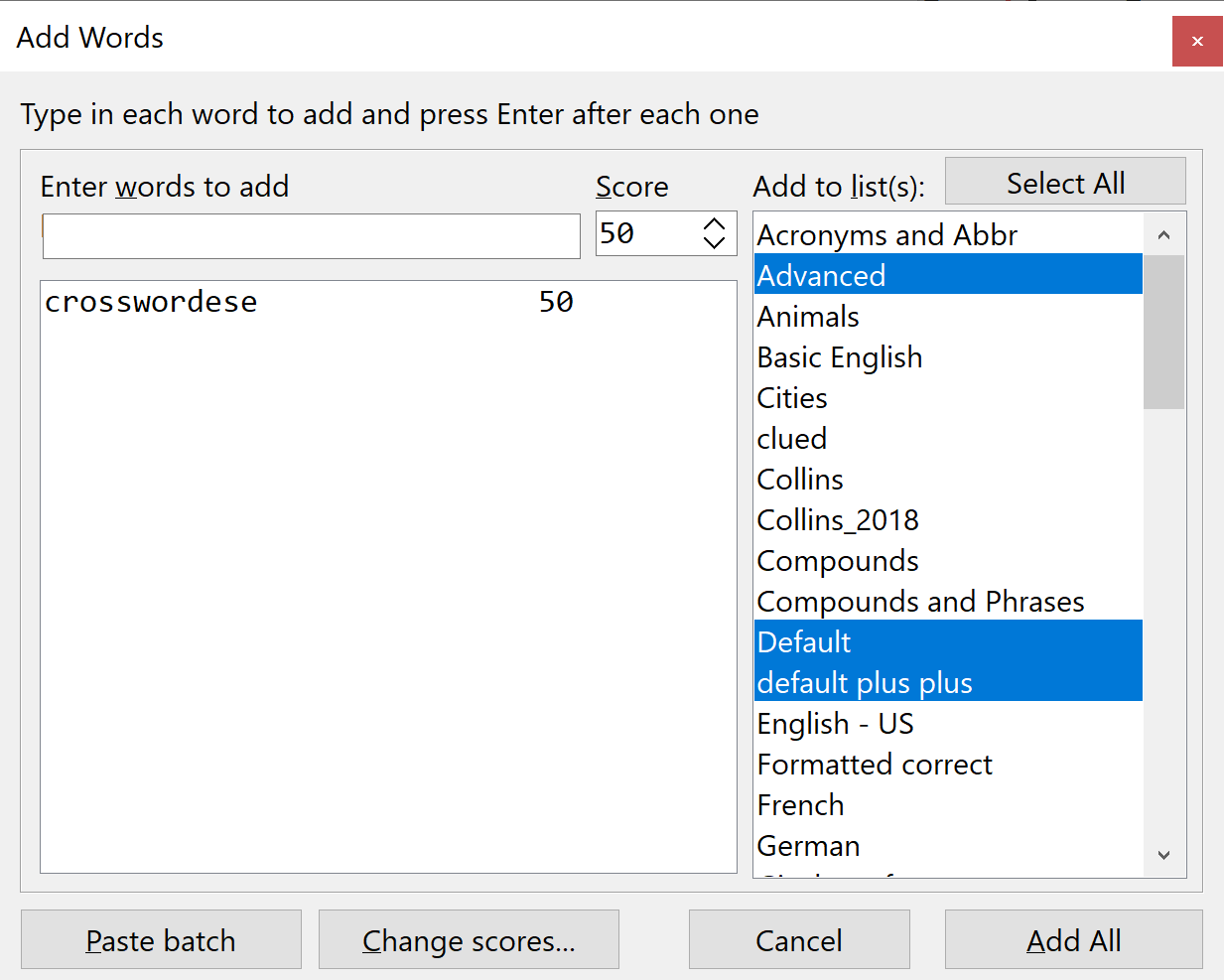
Buttons have been rearranged for easier access to filling functions, and the Words Used window now allows direct editing of scores, as well as removing (or adding) words to multiple word lists at once.

Clue Generator
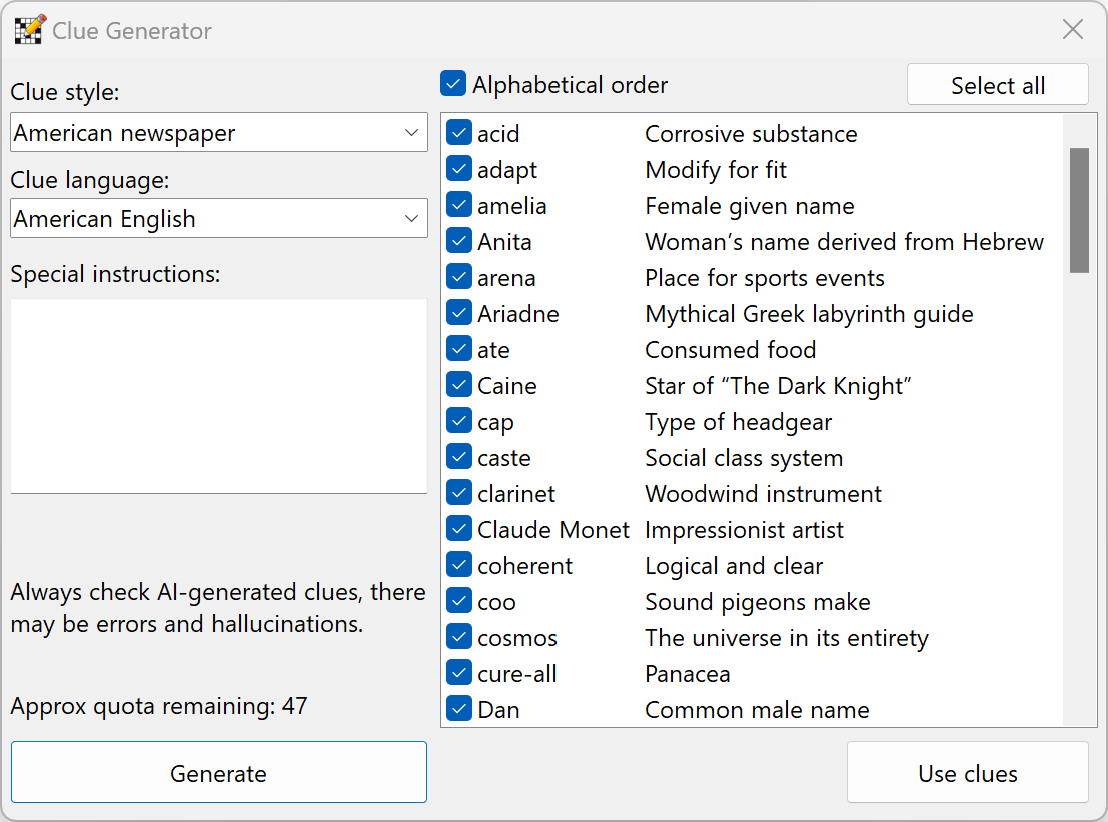
Use AI to generate simple clues for unclued words. Specify the style and language, and optionally give special instructions.
There's also a new AI-powered help assistant on the Help menu, and a generator for theme word lists. See the tutorial video.
Grid Pattern Generator
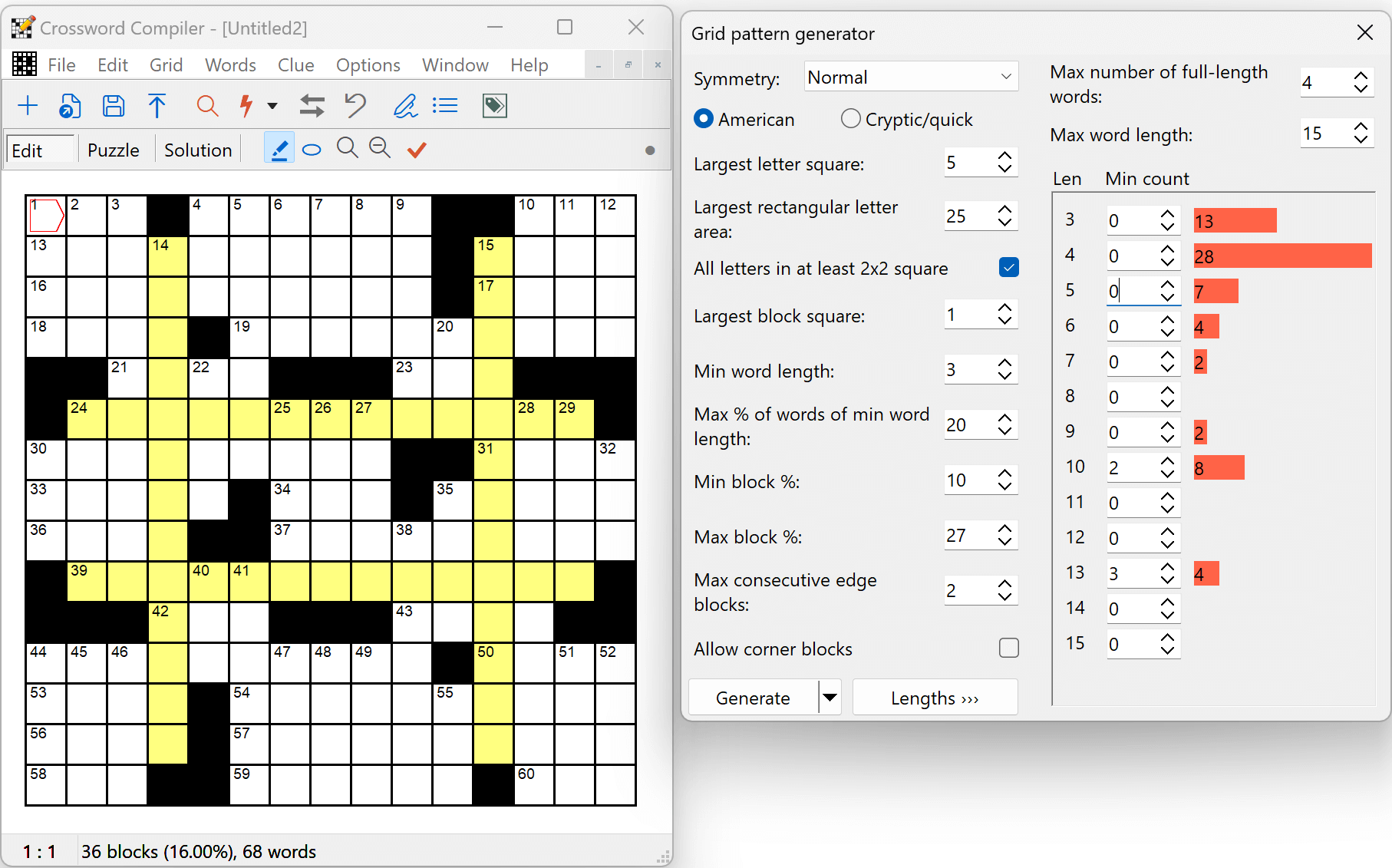
A new feature generates random grid patterns with given constraints, optionally also constrained to fit a specific word length distribution.
Can be used to generate American or cryptic/quick-style grids.
Grid Insight
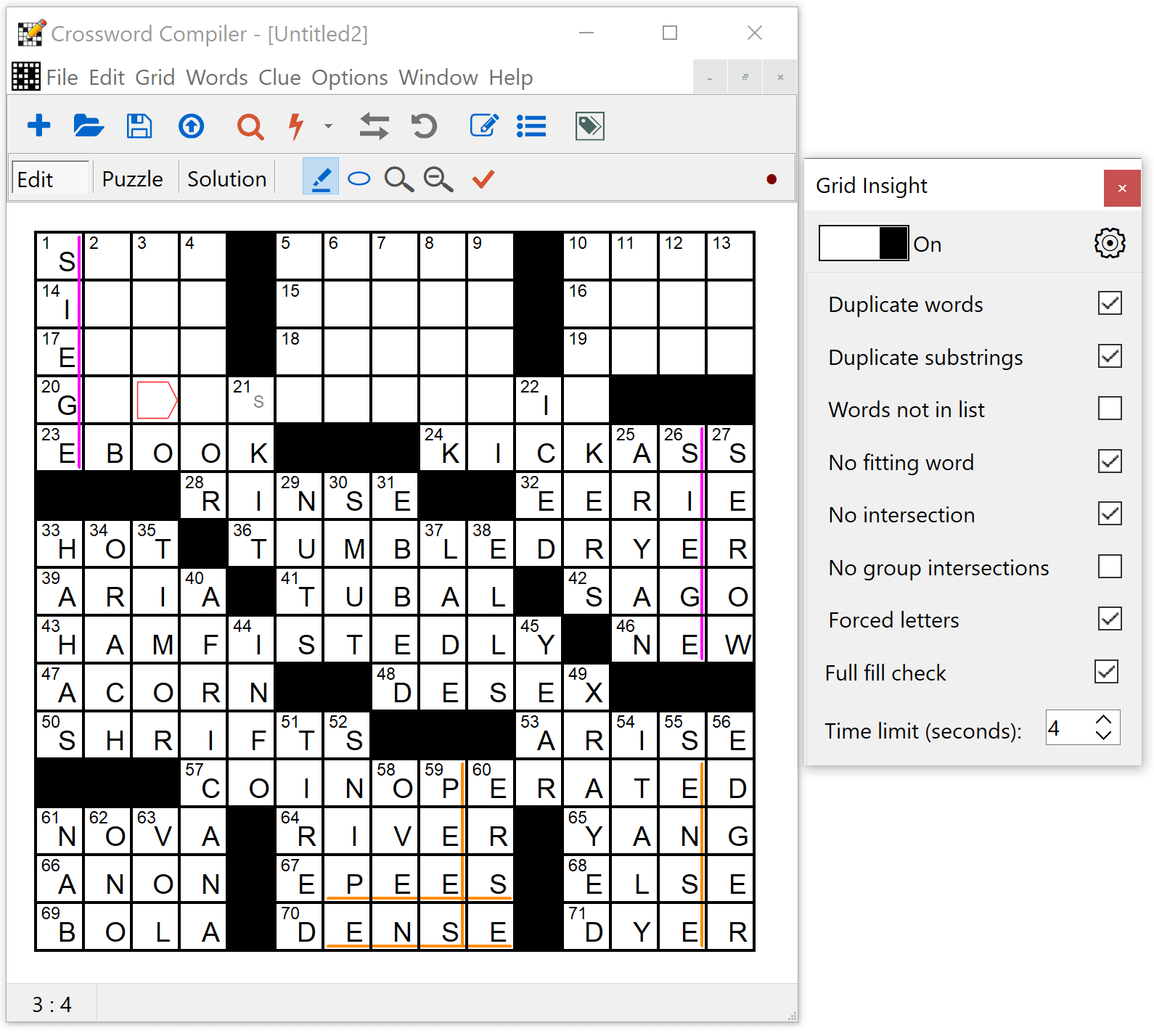
This new feature works in the background to immediately identify problems in the grid like duplicate words, or word slots or areas that are unfillable. It also does a full fill analysis, with an indicator button at the right of the lower toolbar indicating whether the grid section is fillable (green) or not (red). Any forced letters are shown in the grid (the s in skit in the example on the right).
With the Pro Grid Filler installed, Grid Insight can also highlight repeated substrings.
Vocabulary puzzles
The program now keeps track of which words have been used from which theme list, so you can easily remove previously-used words when making subsequent puzzles.
The new "Generate list" feature can also automatically generate a list of theme words from your AI prompt.

Pro Grid Filler
Using Manual Word Selection, the Pro Grid Filler now does a deep background analysis of each possible word choice, indicating if a full grid fill is definitely possible (green tick), and eliminating dead ends. For each possible word, forced word and area fills are indicated, so you can easily find the best word for each slot. The filler iteratively does deeper searches, making full use of your computer's processor to give you the most possible information. By almost eliminating dead-end fills, choosing words to make great fills becomes easier than it has ever been.
For Auto-filling, there are now non-stop filling options to find 10, 100 (or custom number) of best-scoring fills, great for finding the best options to fill a corner of the grid.
A new large scored American word list is provided for use with grid filling. There's support for setting scores per word length, Rebus and letter substitutions, and more; see the Pro Grid Filler page for further screenshots.

Rebus and multi-letter squares
Grid Filling, AutoFind and other functions now have full support for multi-letter squares, e.g. to make Rebus puzzles.
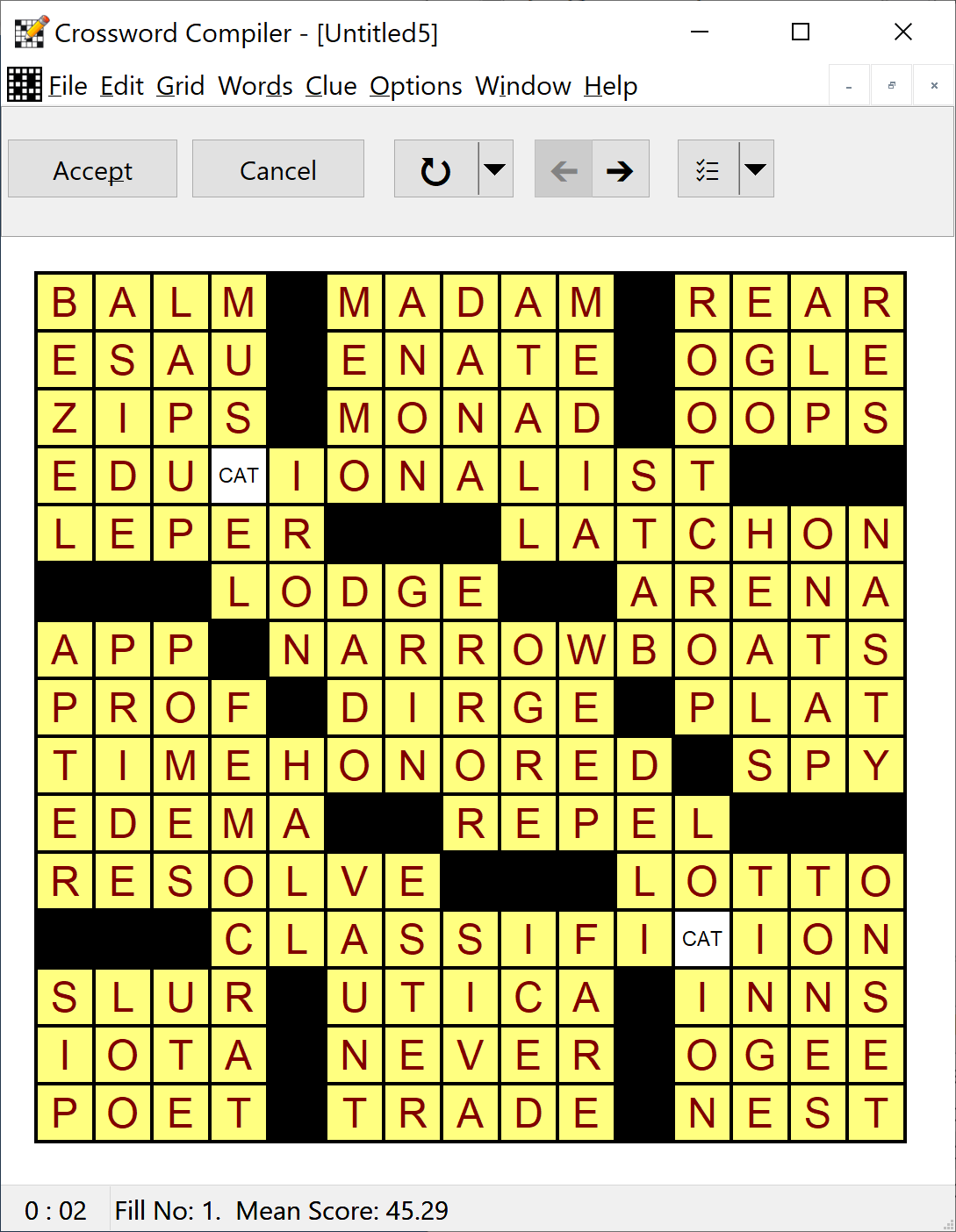
Pre-entered multi-letter squares can be filled around (as shown here, text entered in Square Properties), or with the Pro Grid Filler you can define rebus words to substitute when starting a fill.
Clues in squares
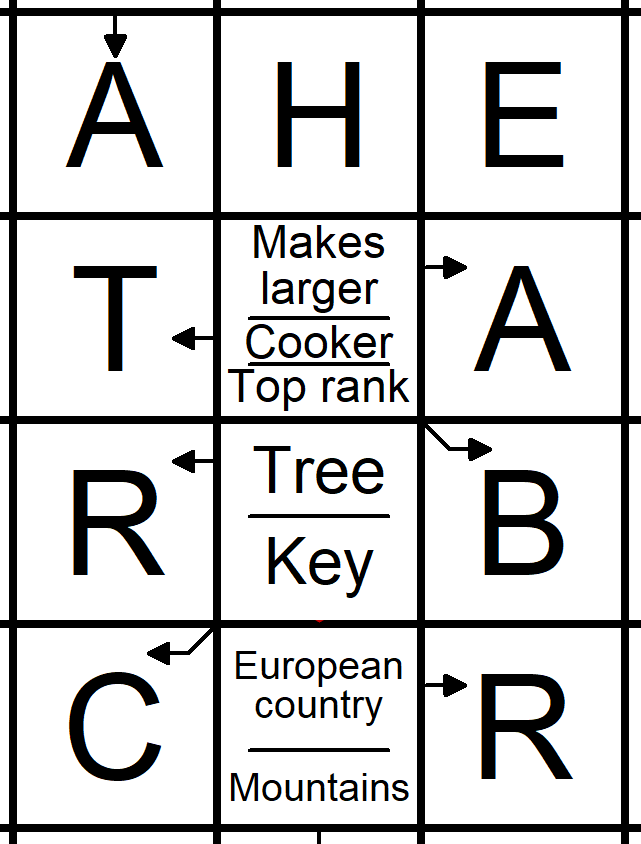
There is a new precision layout engine, with support for diagonal arrows (+ button in Clue Square Editor), thin line separators (half-line font size), and smart sizing to optimally fit text in the square. Generate AI clues for an entire puzzle or individual squares, or use clues from a database.
There are new Clue Square Editor options for word wrap, letter wrap and no wrap (click and right-click on "wrap" in the Clue Square Editor; with no wrap, font size shrinks to fit text). Hidden arrows can now be used to link words without showing in the puzzle.
Word lists
There are several powerful new features for adding and removing words from multiple word lists at once. As well as in the Word List Manager, these features can also easily be accessed when grid filling.
Editing scores is now also a lot easier: they can be edited directly in-place in the Word List Manager as you browse, and in the Words Used window when grid filling. Scores of words in the puzzle can also be changed in multiple word lists (new View/Edit words and scores window on the Words menu).
Dark mode and other themes
You can now change the app theme, using a dark mode or a variety of other styles.
Here you can also see the new theme word tagging (shown in cyan), and a new option to have the copyright under the grid.

Web publishing
The solving applet is now responsive for solving on phones, tablets, and desktops. If the screen is too small to show the whole grid and clues, the current clue is shown in a separate panel.
The applet now supports lossless export of embedded SVG/JPG/PNG images, diagonal clue square arrows, improved clue square layout, embedded scalable graphical buttons, and other enhancements. The WordPress plugin has also been updated for quick puzzle preview.

Other new features in version 11
-
Vocabulary and word search puzzles
- Previously used words are stored for each theme list and saved between sessions
- New powerful word search generator, with improved filling to give hidden words
- New word search option for intersecting letters: must link, allow links or no links
- When generating multiple fills, switch to the fill with the most links, letters, or words, or the fewest unfilled squares
-
Grid filling
- Smarter search for the next best-scoring fill
- Words Used window can now be left open when browsing fills, shows word selection in grid, allows score editing, and has right-click word deletion and multi-list score change functions
- Quick diagnostic for grids that are unfillable because of duplicate word cycles or not enough words of a given length.
- Updated buttons and separate Words Used button with option to always show
- Themed fills preserve a theme word tag/highlighting after the fill is complete
-
Pro Grid Filler (major upgrade)
- Save and reuse sets of grid filling settings (Fill button drop-down in Fill Grid, and the main toolbar AutoFill button drop-down menu for quick access)
- Pro Filler scoring settings for minimum score by word length, for the longest word, and for specific selected words (see Scoring tab in Fill Grid window)
- Pro Filler Special tab in Fill Grid window, for rebus/multi-letter square fills and advanced letter/word substitutions
- Exclude tab in Fill Grid window to exclude words in blacklist or recently used in a clue database
- Manual word selection window automatically fetches more matches if available as words in the first batch are ruled out, and can be resized
- Manual word selection window: simpler right-click to delete forced words, and an option to delete from multiple lists
- Manual word selection window right-click score edit now works when filling with multiple lists, and a new option to change scores in multiple lists
- Manual word selection window has "Use word with clue/citation" drop-down option
- Deeper pre-analysis of partially filled grids for better manual word selection choices and avoidance of dead ends
- Fill Grid window can be resized
-
Clue Databases
- The Add clues from puzzle function now has an option to select only specific clues and works with clue squares
- Support for italic, bold, underline, subscript, and superscript (standard clues, not clues in squares)
- Added database right-click Clue Editor menu option to configure which columns are shown (e.g. can include citation)
- Customizable display font and size (Options, display)
- Clue Editor/Clue Square Editor right-click option to select which columns are shown
-
Clues in Squares
- Use Generate Clues and Use clues from database can now also add clues to clues in squares puzzles
- Add clue square arrows to automatically add arrows after designing a grid pattern
- Hidden Arrows option, to link words without showing arrows in the puzzle
- Clue square font scaling for words that don't fit
- Clue squares can now have both right and right up/down arrows, or both left and left up/down arrows
- Undo deletion of a clue square, restoring original clue/arrow information
- Statistics, Similar words now checks duplicate clue square clues, and clue square words against words in the grid
- Manual word selection window has "Use word with clue/citation" that works with clue squares with well-defined arrows, and clue squares can be edited during manual grid filling by clicking on the square
- Option to restrict database clues to a maximum word length
-
Solving applet
- Fully responsive applet for better mobile experience
- Font size per clue square (in units of lines per square), and better clue spacing
- Support for 1-letter words
- Updated for latest compatibility
- Updated WordPress plugin with puzzle shown in page Preview
- Updated, simplified, and always-HTTPS puzzle upload/registration connections to crossword.info
- Buttons to easily change the crossword.info password
- Improved accessibility support
-
Desktop solving program
- Free Crossword Solver for test solving and your players
- Test Solve button on File menu to open current puzzle in Solver
- Support for Save As .ccxml format, which can be associated with Solver.
-
Export/import
- New bulk export feature to export multiple puzzle files at once
- Portable scalable puzzle images with SVG export
- Landscape and custom page size for PDF export
- Native support for PNG/JPG images (smaller file size for high-res images)
- File, Export, PDF can reproduce File, Print options; quick-set button for settings for puzzle review/submission
- Export, Rich Text supports the latest Word rich text formatting (Copy works again with columns and wrap-around grid)
- Support for version 2.x .puz file import/export (including Unicode clue/info support)
-
Word Lists
- Word List Manager allows direct inline editing of word scores
- Word List Manager's "Add Words" and "Remove Words" can now add to/remove from more than one list at once
- Word List Manager's "Remove words from" function can now remove multiple lists at once
- Word List Manager's right-click menu option to remove selected words from multiple lists, and add selected words to other lists
- Word List Manager's right-click menu option to edit scores in multiple lists
- New "View/Edit word scores" function (Words menu and stats window drop-down)
- Word list Undo using auto-backup of changes; new window to view and restore previous versions, and settings for maximum disk space to use
- New feature to view word list statistics (word lengths, scores, formats, letter distribution)
- Right-click menu options to change case of selected words (with Ctrl shortcuts) and modify punctuation
- Menu options to add or remove a selected list from multiple other lists
- Duplicate/Filter Word list option to filter on a variety of case/punctuation format matches, and to only keep words not matching a pattern
- Change Scores has new options to scale and/or round scores
- Score filter option to view words with a specific selection or range of scores ("...")
- Right-click pop-up menu on the list of main word lists (mirroring menu at the top)
- Equivalent letters option to change which punctuation is ignored in the grid
- Convert to plain text has new options to choose score separator and encoding
- Convert text word list has new options to customize which punctuation is trimmed and which extended characters to ignore
- Change case/formats window has new options to remove punctuation except space, hyphen and apostrophe, apply formats from another list conditional on case or format match, change quotes to smart quotes, remove quotes and hyphens, and strip accents
- Much faster copy/delete words in Word List Manager and other general word list speed improvements
- Add and remove words from Statistics, Words
- Default word list font updated to Consolas
- Added Encoding selection drop-down to plain text import windows (e.g. for UTF-8 encoded Unicode text)
- Fixes for import of out of range scores
-
AutoFind/Word Find
- Support for multi-letter/rebus squares
- AutoFind window settings button
- Option to show scores in AutoFind and Word Find (settings button, or Change List Usage, Word Finding)
- AutoFind window right-click option to add to or remove from multiple lists
- Ctrl+C copy word in AutoFind
- Word Find search button drop-down for case and punctuation sensitive search, and whether to show scores
- Find Word and Anagram window can now be left open and always enabled.
-
Clue Editing
- Tag each clue/word as a theme word or add custom tags (view tag distribution in Statistics)
- Review/Edit Clues has option button to show and allow editing of explanations/citations, change spacing and font size setting
- Review/Edit Ctrl+F to search clues, Ctrl+Shift+V to paste plain text
- In Review/Edit, editing a clue or clicking on the solution word now also selects the word in the grid
- Clue Editor can now be made wider
- Linked Clues window solution word can be edited, shows word selection in grid, and will use any preselected slots in the grid
- Anagram window updates word if open when Clue Editor navigates to new word
- Editing database clue in clue editor now preserves scroll position and selection
- Import clues preserves citation information where clues are identical
- Option to show character count (and Across/Down character counts in Statistics)
-
Grid Patterns
- New Grid Pattern Generator to make new grid patterns to various specifications
- Thousands of new grid patterns in the default grid libraries of various sizes
- New Grid Library Manager for managing grid patterns, renaming all patterns, extracting patterns from files, copying and deleting grid libraries
- New Dual Mirror and Maximum grid symmetry settings
- Redo function when editing manually
-
Add-ons
- WordWeb Pro version 10, with new words and updates, and support for the latest embedded browser
- New Ctrl+W hotkey and right-click menu option to look up selected word in WordWeb Pro from Word List Manager, Review clues, Find Word, Words Used, View/Edit word scores, Statistics and manual word selection; Ctrl+W also works in AutoFind
- Additional word lists updated (Wikipedia word list now scored by relative view popularity, and a set of subject lists)
- Updates to the Oxford Dictionary of English and New Oxford American Dictionary add-ons, and updated Collins Dictionary. These dictionaries should now be regularly updated (about once a year) with an ongoing subscription.
-
Miscellaneous
- Crossword key word has option to number the circled squares
- Support for bottom-right numbers
- Enlarged default American clue database and default word list updates
- Auto-backup of files being edited; file state restored automatically next time the program is opened after a Windows restart or crash; setting in Preferences
- Automatic notification of update availability (can be silenced)
- Option to replace existing picture when right-clicking on picture in grid, use menu or drag-drop replacement file
- Puzzle solving instructions can now use formatting (bold, italic, etc.)
- Panning around large grids with trackpad/scrolling with mouse wheel supported
- Ctrl+Scroll Wheel (pinch on trackpad) to zoom grid
- Rebus/Multi-letter squares handled much more consistently throughout; Square Properties letter text editing simplified
- Sudoku checker now works with squares that contain more than one letter
- Style checking custom selection, including unchecked letters and isolated regions
- Similar words now also checks partially-complete words in the grid
- Statistics, add puzzle words/clues and other windows can be resized
- Added bar count to Statistics (bars between letter squares only)
- Lower toolbar shows lock icon when grid is locked
- New Puzzle wizard allows customization of alphabet when making coded puzzles
- Edit, Select All option to select unchecked letters and rebus letters
- Edit menu, Copy Selected Letters function
- PDF version of help file linked from Help menu
- Default grid size selection range extended
-
Compatibility
- Word lists, clue databases and other files are the same format as in version 10 and 100% compatible.
- Puzzle files are compatible with v10, and v11 files can be opened in v10 unless you use new features like diagonal arrows
About | Privacy | T&Cs | Contact
Copyright © 2026 WordWeb Software. All Rights Reserved.